

Maintaining SOC 2 compliance is not a one-time event; it is a continuous state of operational readiness. Among the many trust service criteria, logical access termination often presents the highest risk of failure during an audit. Most organizations believe they have a handle on their offboarding process, yet auditors frequently find "ghost" accounts and delayed deactivations that create significant control gaps.
Failure to properly manage offboarding controls leads to more than just a bad audit report. It creates an insider risk profile where former employees retain access to sensitive production environments, customer data, and proprietary code. If your current process involves manual spreadsheets and "reminders" to IT, you are likely making one of the following seven mistakes.
1. Relying on Manual Checklists and Human Memory
The most common mistake in logical access termination is the use of manual checklists. While a checklist is better than nothing, it is prone to human error and oversight. An IT administrator might miss a specific line item during a busy Friday afternoon, or a "one-off" contractor might not be included in the standard workflow.
Manual processes lack the scalability required for a growing organization. When you add more systems: GitHub, AWS, Salesforce, and internal databases: the checklist grows, and the likelihood of a missed step increases exponentially. Auditors look for consistency, and manual checklists are the antithesis of a predictable, repeatable control.
The Fix: Transition to an automated user deprovisioning system. Automation ensures that every termination follows the exact same logic every time. By removing the "human" element from the execution phase, you eliminate the possibility of a forgotten account.
2. Missing the "Evidence" in Audit Evidence
A common saying in the compliance world is: "If it isn't documented, it didn't happen." Many organizations successfully disable accounts but fail to produce audit evidence for access removal that satisfies an auditor’s scrutiny. Simply saying an account is disabled is insufficient.
Auditors require proof. They need to see a timestamped log showing exactly when the request was made and exactly when the access was revoked. If you are manually taking screenshots of "User Disabled" boxes in Active Directory every time someone leaves, you are wasting valuable engineering hours on a low-value task.

The Fix: Use a platform that generates tamper-resistant, audit-ready evidence as a byproduct of the action. The system should automatically log the HR trigger, the deprovisioning command, and the confirmation from the target system. This turns your offboarding activity into an automated compliance artifact.
3. Violating the "24-Hour Rule"
In the world of SOC 2, timing is everything. Most access control policies state that logical access must be revoked within 24 hours of termination. However, the reality of many organizations involves a "lag" between HR finishing the paperwork and IT receiving the ticket.
If an employee leaves on a Tuesday morning but their access remains active until Wednesday afternoon, you have a control deficiency. Auditors sample your HR records and compare them against system logs. Even a few hours of delay can result in a negative finding if it happens consistently across your samples.
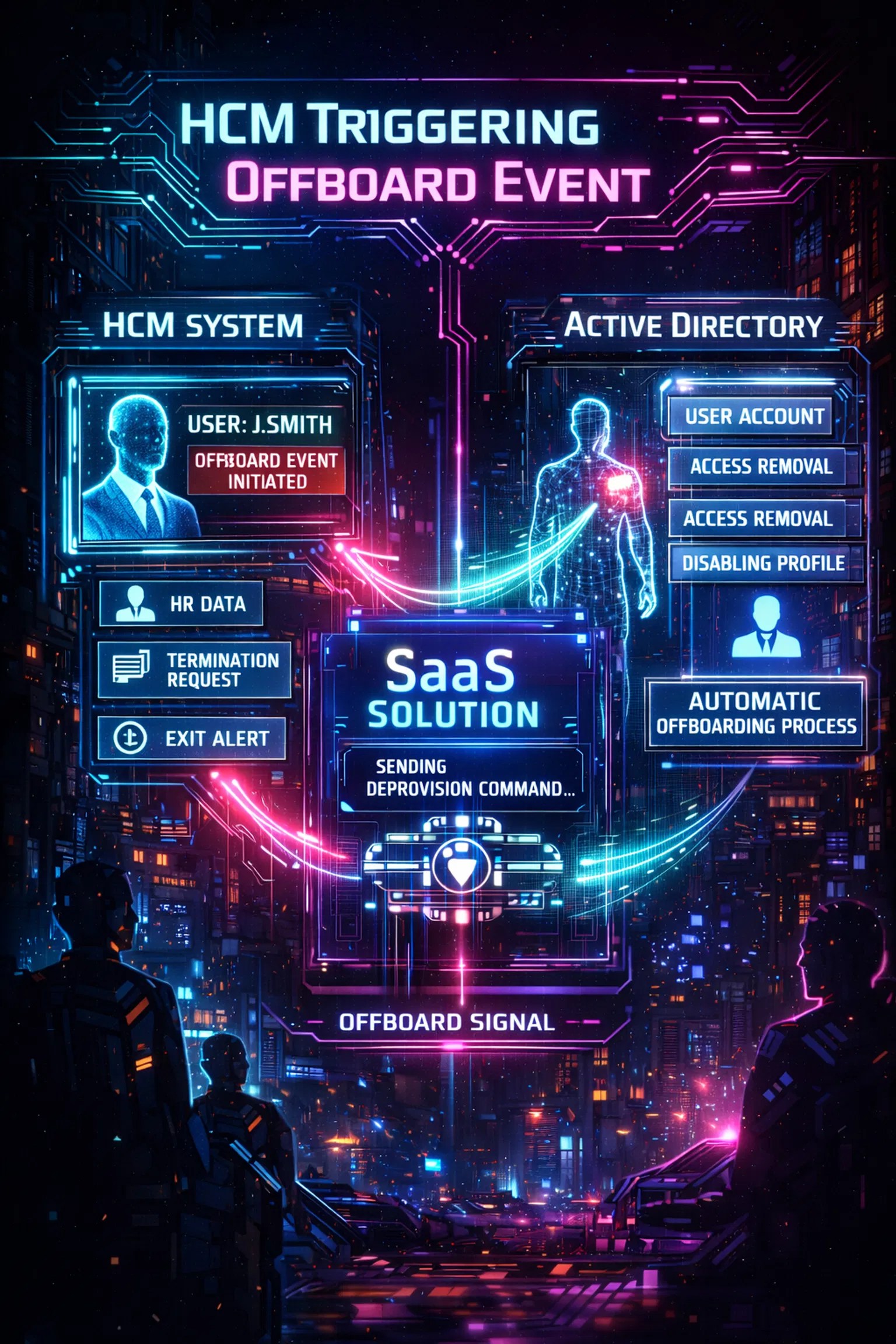
The Fix: Implement HR-triggered offboarding. When the HR system marks an employee as "Terminated," the IAM solution should immediately initiate the shutdown process across all domains. This removes the "waiting for a ticket" delay and keeps you well within the 24-hour compliance window.

4. Failing to Manage Multi-Domain Complexity
Many mid-market companies and enterprises operate across multiple Active Directory domains or diverse identity providers. Often, these domains have different naming conventions (e.g., j.doe in one domain and john.doe in another). Traditional scripts frequently fail to account for these nuances, leaving accounts active in secondary domains.
If your offboarding tool only sees "Domain A" but the user also has an account in "Domain B," you have a "ghost" account problem. This is a primary target for auditors who look for account discrepancies across the environment.
The Fix: Look for a multi-domain Active Directory management solution that supports flexible identity matching. Your offboarding logic must be person-centered, not just account-centered. It should correlate the person across all domains and ensure that when they leave, every associated identity is neutralized simultaneously.
5. The Communication Gap: HR vs. IT
Offboarding is often treated as an IT problem, but it is fundamentally an HR event. The biggest mistake organizations make is allowing a communication gap between these two departments. If IT is the last to know about a termination, the organization is exposed to risk the entire time the "news" is traveling via email or Slack.
A "lean team" cannot afford to play phone tag. Relying on an IT manager to "remember" to disable an account after an exit interview is a recipe for disaster.
The Fix: Establish HR as the "Authoritative Source." By integrating your HCM (Human Capital Management) tool directly with your deprovisioning engine, you ensure that the moment a change is made in HR, it is reflected in IT. This creates a single source of truth and enforces accountability across the organization.
6. Ignoring Shadow IT and Third-Party SaaS
While it is easy to remember to disable a Google Workspace or Microsoft 365 account, it is much harder to remember the 50+ SaaS tools that employees use daily. From GitHub to Figma to AWS, these applications often live outside the primary SSO umbrella if they aren't configured correctly.
If a former developer still has SSH keys or a personal login to a production database, you have a critical security vulnerability. SOC 2 requires that all logical access be terminated, not just the "main" ones.
The Fix: Organizations should look for an Okta lifecycle management alternative that offers broad integration capabilities without the enterprise-level price tag. The goal is to standardize the offboarding lifecycle so that no application: no matter how niche: is left with active access for a terminated employee.
7. No Re-certification of Termination Results
The final mistake is assuming that "Disabled" means "Safe." Sometimes, a script fails, or a system is temporarily offline during the offboarding event. Without a confirmation loop, you might believe an account is gone when it is actually still lingering in a "partially disabled" state.
Audit-readiness requires not just the action of removal, but the verification of that action. You must be able to prove that the system confirmed the account is no longer active.
The Fix: The platform should provide a success confirmation for every action. This "closing the loop" is essential for governance. High-stakes environments require a tamper-resistant record that the command was not only sent but successfully executed.

Conclusion: Turning Offboarding into a Compliance Asset
Offboarding should not be a manual burden that keeps your IT and GRC teams awake at night. By automating the process, you turn a high-risk vulnerability into a streamlined, audit-ready asset. Whether you are looking for a SailPoint alternative for small business or a way to simplify ISO 27001 offboarding evidence, the solution lies in moving away from manual workflows.
Consistent, HR-triggered automation ensures that accounts are disabled fast, safely, and with full traceability. This proactive approach reduces operational risk and provides the clear "proof" that auditors demand.
Summary of Recommendations:
- Centralize: Use HR as the single trigger for all access removal.
- Automate: Remove manual steps to eliminate human error.
- Document: Ensure every action generates a timestamped log.
- Validate: Confirm that access was actually removed across all domains.
Protect your organization and simplify your next audit by standardizing your offboarding lifecycle today.
Leave a Reply