
For organizations pursuing SOC 2 compliance, the termination of logical access is often a primary point of failure. Auditors do not merely ask if you remove access; they demand proof that it happens consistently, promptly, and across every system an employee once touched. Manual offboarding processes are prone to "control gaps," where a single missed step in a spreadsheet leads to an audit finding or, worse, a security breach.
The traditional manual handoff between HR and IT is too slow for modern security standards. When a termination occurs, every minute of "ghost access" represents a liability. To meet the rigorous demands of SOC 2, organizations must shift from reactive ticketing to proactive automation.
By automating access removal, the platform eliminates human error and generates the necessary evidence capture as a natural byproduct of the workflow. This guide outlines five essential steps to transform your offboarding from a manual burden into a tamper-resistant governance process.
Step 1: Designate the HRIS as the Authoritative Source
The most common point of failure in offboarding is the communication gap between the HR department and the IT team. When HR processes a termination but IT isn't notified until hours or days later, the organization is out of compliance. SOC 2 requires that access is revoked "promptly," which usually means the same business day or even the same hour for high-risk departures.
To solve this, the HR Information System (HRIS) should be the authoritative trigger for all access changes. Instead of relying on an email or a manual ticket, the offboarding platform monitors the HRIS for status changes. When an employee’s status is updated to "terminated" or a future termination date is set, the automation engine prepares the deprovisioning sequence.
Using the HRIS as the trigger ensures that no employee is ever "forgotten." It standardizes the lifecycle and removes the need for manual data entry, which is where most identity mismatches begin. A centralized trigger ensures that policy-driven actions occur the moment the business decision is finalized.
Step 2: Map Identities Across Multi-Domain Environments
Modern environments are rarely limited to a single identity provider. Most companies manage a complex mix of cloud-native SaaS applications like Google Workspace or Microsoft 365, alongside legacy on-premises systems like Active Directory. This "identity sprawl" makes it difficult to ensure that every account tied to a specific person has been disabled.
The second step is to establish flexible identity matching across all domains. The platform must be able to correlate a user’s HR profile with their various system accounts, even if the usernames don't perfectly match. This prevents "orphan accounts": active credentials that remain in the environment because they weren't explicitly linked to the departing user during the offboarding process.
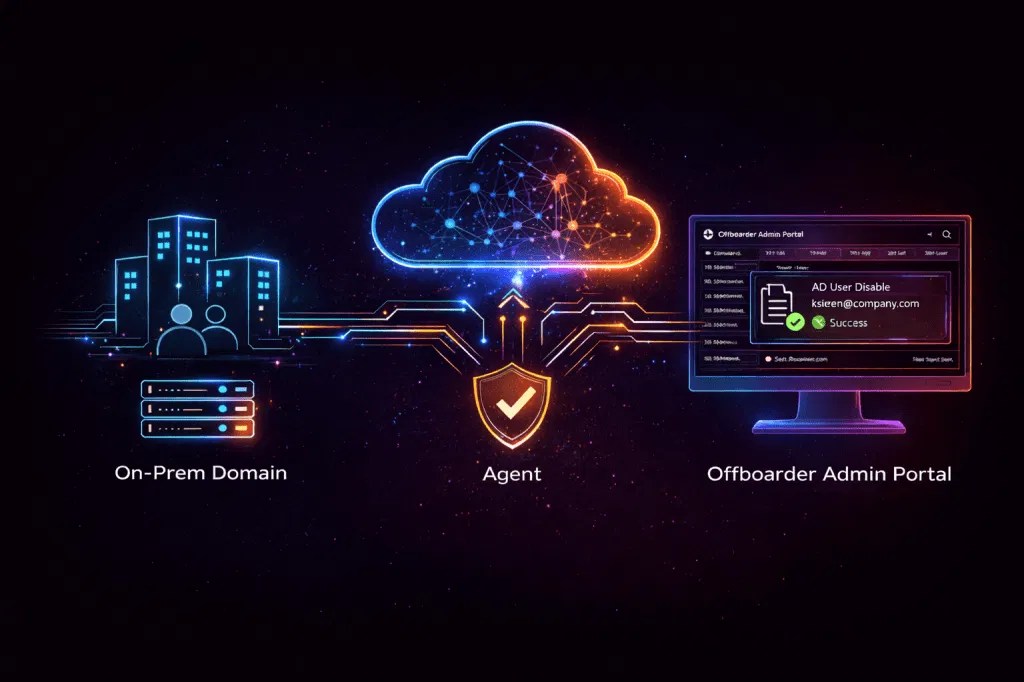
Offboarder’s modern architecture uses a lightweight on-prem agent to bridge the gap between cloud triggers and local systems. This ensures that even your most deeply buried legacy servers are included in the automated sweep. Mapping these identities before a termination occurs creates a reliable blueprint for access removal, closing potential backdoors before they can be exploited.

Step 3: Implement Trigger-Based Access Revocation
Once identities are mapped and the trigger is set, the actual revocation must be handled through automated workflows. Manual deprovisioning: where an IT admin logs into ten different dashboards to click "disable": is not scalable and leaves no clear evidence trail.
Automated revocation should follow a specific sequence:
- Primary Identity Disablement: Immediately disable the account in the Identity Provider (IdP) or Active Directory.
- SaaS Application Deprovisioning: Use SCIM or API integrations to revoke access to critical apps like Salesforce, Slack, or GitHub.
- Group Membership Removal: Clear the user from all security groups and distribution lists to ensure they no longer inherit permissions through role-based access.
This trigger-based approach ensures speed and consistency. If you want to learn more about why this matters, read about the 7 mistakes you’re making with SOC 2 offboarding controls. Automation guarantees that the process is executed the same way every time, regardless of which admin is on duty.
Step 4: Collect Tamper-Resistant Audit Evidence
For SOC 2, the actual removal of access is only half the battle. You must be able to prove it happened. Auditors typically ask for a sample of terminated employees and require evidence of the exact time and date access was revoked.
Collecting this evidence manually involves taking screenshots of admin consoles or digging through thousands of lines of system logs: a process that is both time-consuming and prone to human error. A robust automation platform generates "audit-ready" evidence automatically.
Every action taken by the platform is logged in a tamper-resistant format. This includes the timestamp of the HR trigger, the specific accounts disabled, and the success confirmation from each target system. Instead of hunting for logs, you can generate a report in minutes. For more details on this, see our guide on how to create audit-ready offboarding evidence in 5 minutes.

Step 5: Establish Continuous Governance and Review
SOC 2 is not a "one and done" event; it requires continuous monitoring. Even with automation, your offboarding policy should include periodic access reviews to ensure that no accounts were missed due to technical debt or misconfigurations.
Automation doesn't just execute tasks; it provides the governance layer needed to oversee the entire lifecycle. By centralizing the offboarding data, the platform allows security teams to identify trends, such as high failure rates in a specific integration or delays in HR data synchronization.
Strong logging helps turn activity into accountability. By standardizing the offboarding lifecycle through automation, you move away from a "best efforts" model to a state of provable compliance. Organizations should treat offboarding as a critical security control, not an administrative task. Consistent, automated processes are the only way to satisfy the high-stakes requirements of modern cybersecurity audits.
To get started with these integrations and see how the platform connects to your existing stack, visit our integrations page.
Leave a Reply